Valeria Montrucchio

This is a password-protected portfolio.
Please enter the password to continue.

Global Navigation · HubSpot

Navigating complexity at HubSpot scale

I broke the deadlock that had kept the nav stalled for years. Then went further: building a discovery system — a personalised nav that knows your goals and business intent.

Role
UX Director, Platform UX
Scope
Strategy · Governance · Research · Team Leadership
Key outcomes
+16% activation · +22% CRM usage · CVR held
1
Structured for sales. Not for customers.
Chapter 01 · The problem I inherited

One nav, every activation target — and a redesign stuck for years

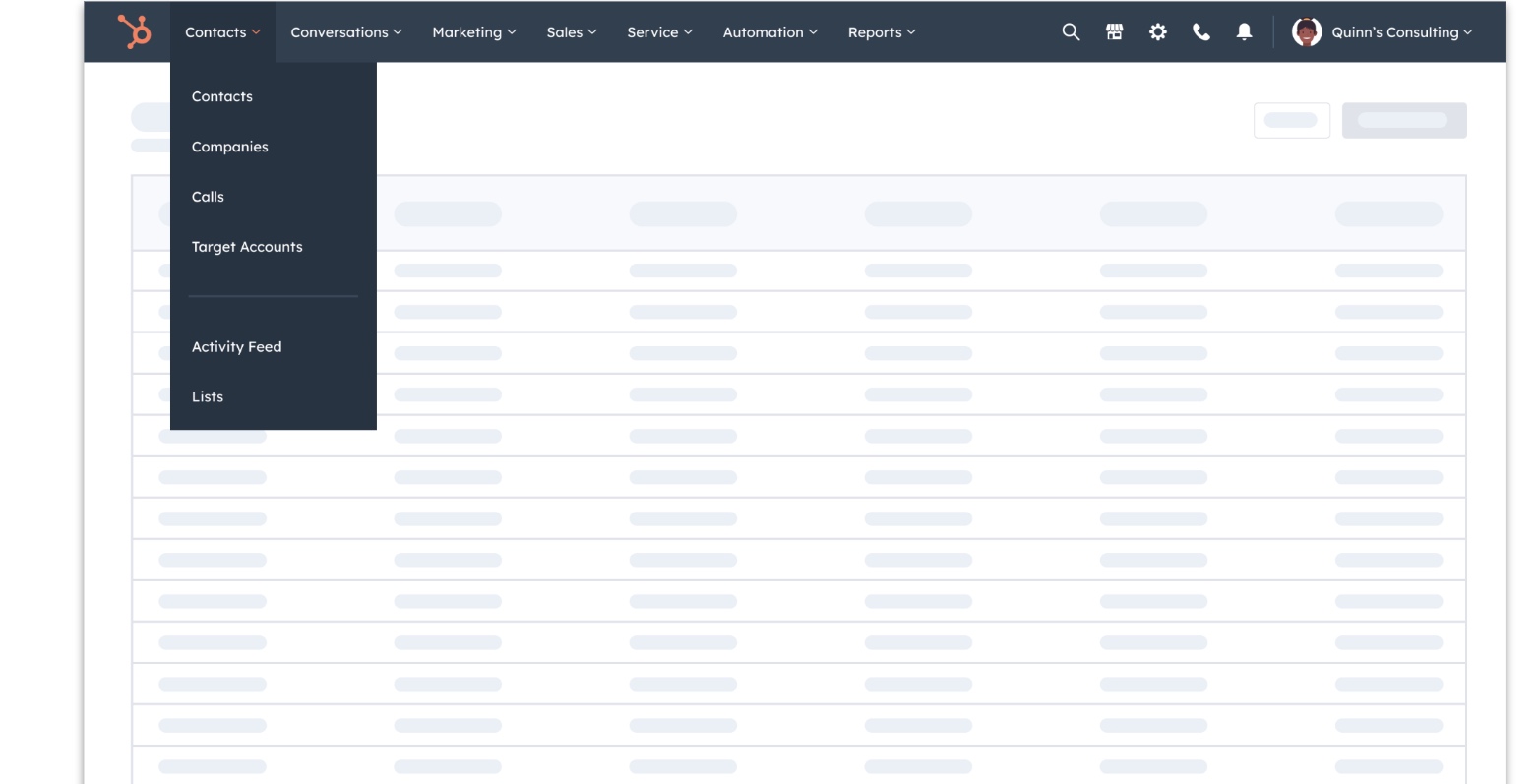
HubSpot's nav was built around how we sell — HubSpot's 5 Hubs — and navigation was the only way users discovered what HubSpot could do for them. Every product team's activation numbers depended on it. That's what made restructuring so hard: any change to the IA could have been a threat to some metric. The redesign had been in flight for almost a year. What was missing wasn't a design direction — it was the organizational clarity to move, and the understanding that fixing the nav was step one of a longer journey, not the destination.

Original navigation

Original HubSpot horizontal navigation
01
Monetization risk
The problem
Paywalled items cluttered wayfinding — but moving them risked reducing conversion pressure. Nobody wanted to own that tradeoff without hard evidence.
How I solved it
Talked to many customers across all roles, built an experimentation structure to test hypotheses. The data ultimately showed CVR held — and in some cases PQLs increased.
02
Leadership alignment across five Hubs
The problem
Every Hub leader had activation targets tied to nav visibility. Any IA change felt like a threat to their numbers. Getting alignment meant navigating five different priorities simultaneously.
How I navigated it
Maintained careful, continuous communication with all leaders throughout. No surprises. Brought usage data, JTBD evidence, and each Hub's strategy into a shared model — so decisions felt data-driven, not politically imposed.
03
Unclear ownership
The problem
The navigation team owned nav BE and FE — but ownership of where tools would go and who controlled the overall IA was unclear. "Who decides" was a recurring question in every cross-team review.
How I solved it
Built governance before it was needed — request guidelines, decision frameworks, clear ownership lines. Governance wasn't overhead. It was the precondition for moving at all.

Five product lines, each with their own tools, strategies, and activation goals. I structured the IA by synthesising tool usage data, JTBD frameworks, and each Hub's strategy into a coherent model — backed by multiple rounds of research and sustained alignment with leadership until the direction became something everyone could stand behind and ship.

Chapter 02 · The structural bet

From hub logic to jobs-to-be-done

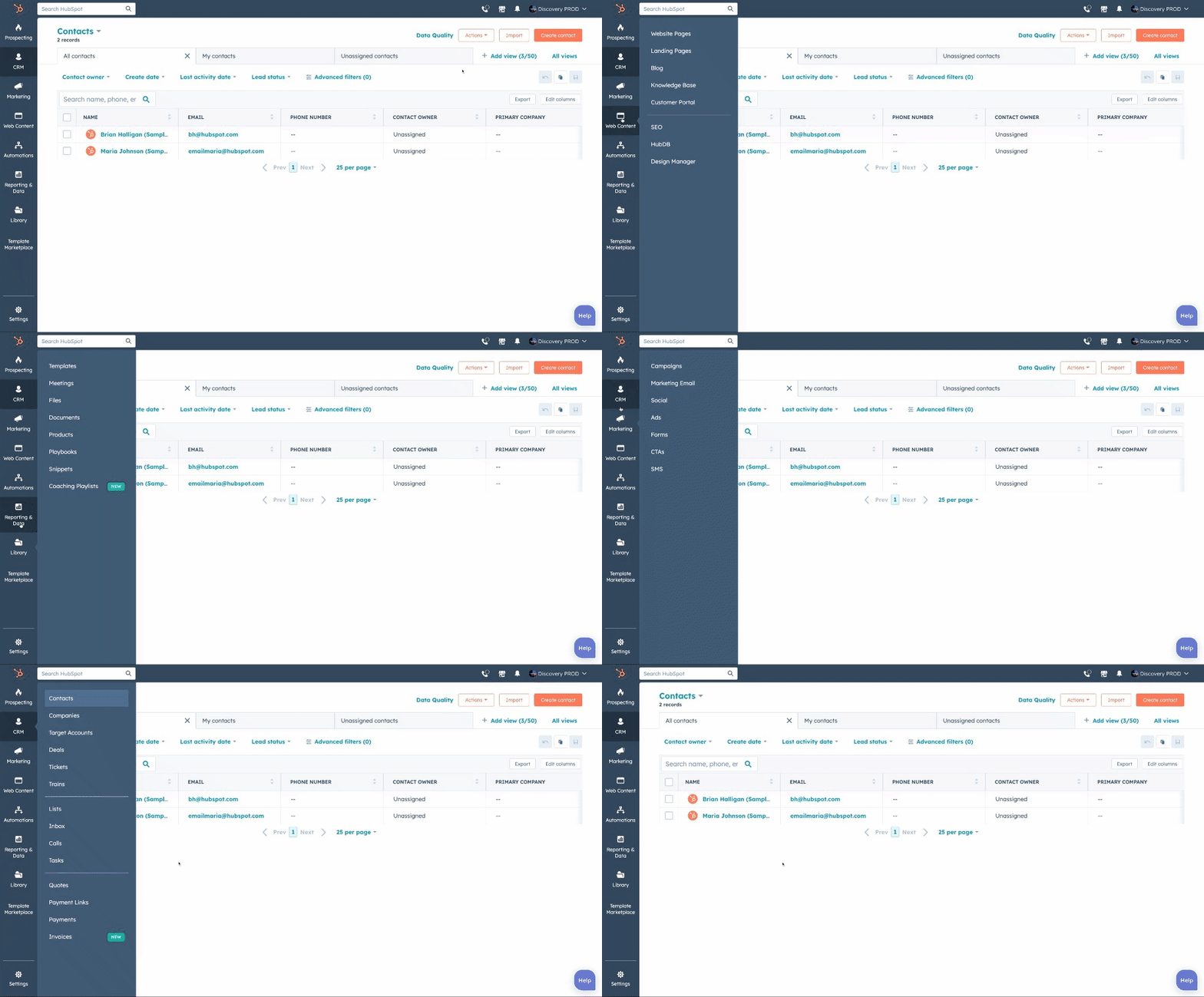
When I joined, the first decision I led was to move to a JTBD model — but the design was still anchored on a horizontal layout. I made the call to go vertical: more scalable, aligned with industry standards, and better suited to a platform that would keep growing. Then I held one principle under constant pressure: one tool, one place.

Vertical JTBD navigation

Vertical nav, tested with 140+ customers

"It feels a lot cleaner… Visually it feels less overwhelming."

HubSpot customer · Moderated study

"It reminds me of other CRM systems, the interface is very clean and easy to navigate."

Non-customer · Unmoderated study

Governance principle

Tools were grouped into JTBD categories, but each tool lived in exactly one menu. No duplicates. This preserved IA integrity — we reduced the findability problem. We knew we hadn't eliminated it.

85%
Positive first impressions
Of first-impression reactions to the proposed nav were positive — matching the existing nav's 84% baseline. The research gave us confidence to move — not just enthusiasm, but data.
Ease of use across task types
Ease of use improved across General, Sales, and Marketing tasks. An intuitive structure that matched how customers actually work.
Chapter 03 · Launch

Validated in market — and evolved from customer feedback

The data said the structure was right. The feedback said the interaction model needed work. My job was to make sure those two things were heard separately — so we could iterate on the real problem, the interaction, and not the IA.

+16%
Tool-level activation
Users found the tools they needed to complete their job — the IA was working.
2
Top nav switches eliminated
Users stopped jumping between Hubs to complete their work — the JTBD structure was more intuitive.
Ease-of-use scores across main Hubs
An intuitive, jobs-focused IA felt easier to use — customers oriented faster and with more confidence.
0
Monetization impact
The nav's role in discovery and activation was preserved — a better IA did not come at a commercial cost.
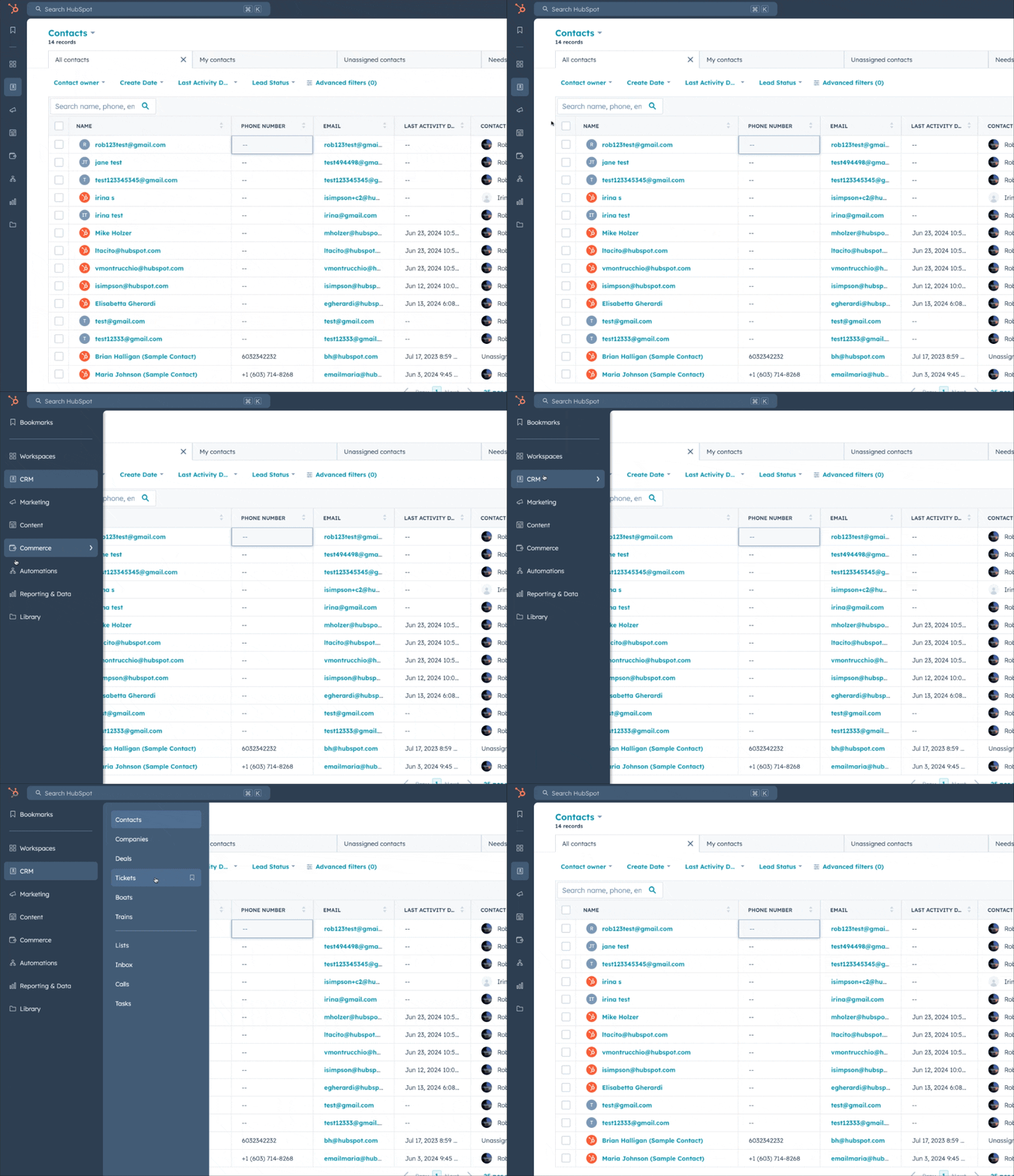
Nav (May 2024)

Nav (May 2024)

Nav (July 2024)

Nav (July 2024)

3,000+ in-app survey responses · July 2024

What customers told us — and how we responded

01
Too many clicks (35%) · Disruptive hover (31%)

"Too much clicking is involved. I want to just hover over the sections I want to expand rather than clicking every time."

In-app survey · July 2024

"The bar keeps opening when you come near the left. It makes working in the left column very difficult."

In-app survey · July 2024

How we solved it
Removed the initial click requirement and the expand-on-hover interaction. Users no longer need to click to expand, making the interaction feel immediate and reducing the perceived step count. The nav no longer activates by proximity — only by intent.
02
Takes up too much space (19%)

"I like my horizontal space — you have taken it away for no reason while leaving a top bar which is mostly empty."

In-app survey · July 2024

How we solved it
Updated the secondary menu from a full panel to a floating design, significantly reducing the nav's footprint. The nav now feels lighter and less intrusive — drawing less attention while you work.

NPS recovered — within 6 weeks

Launch caused a short-term NPS dip. We immediately made the changes and NPS recovered in less than 2 months to pre-launch levels, staying stable for 3 continuous weeks. Nav-specific complaints dropped to ~5 per week. Daily monitoring stopped.

Chapter 04 · The signal that changed everything

Bookmarks validated the hypothesis before we built the system

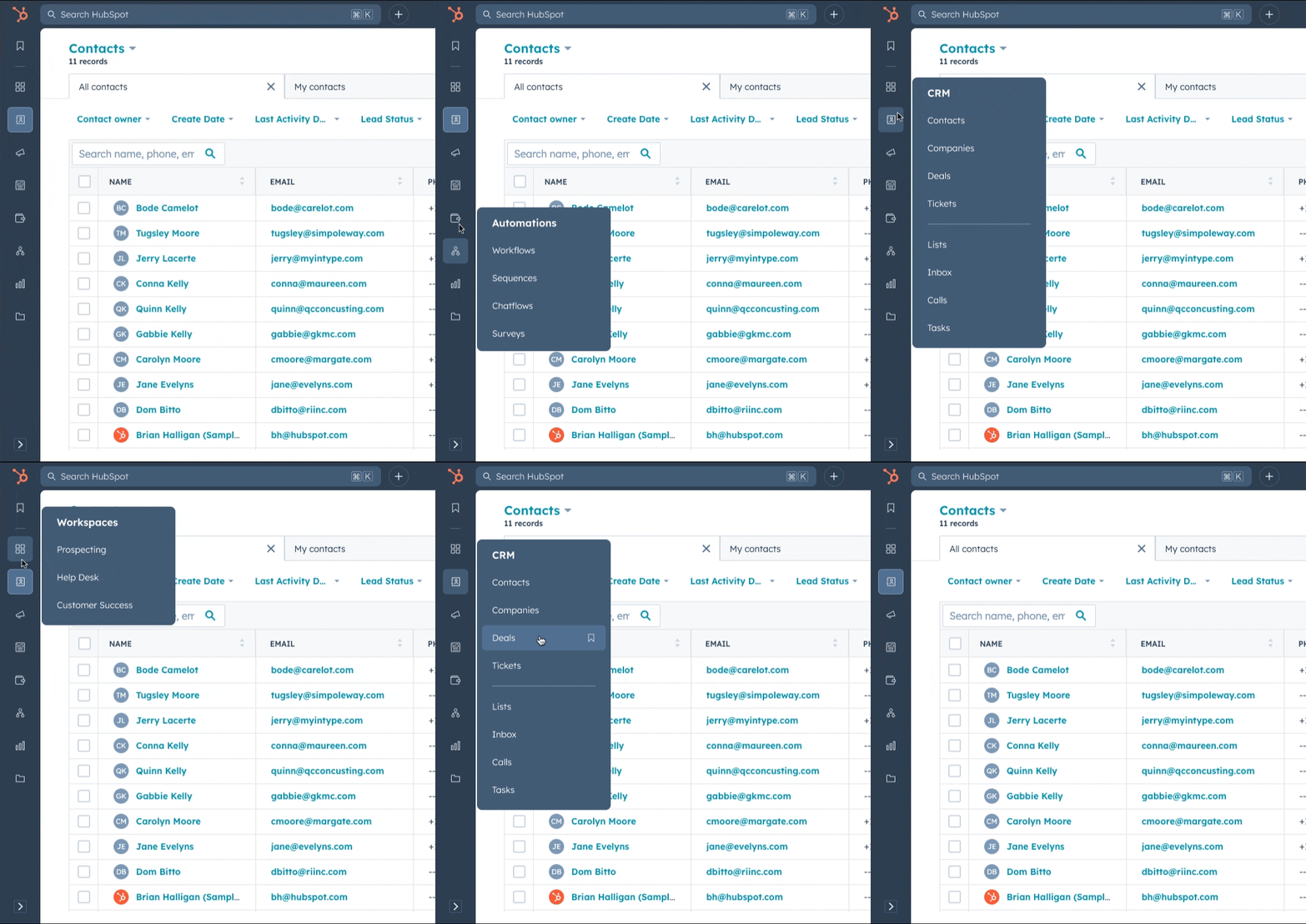
We shipped bookmarks. 59% of users adopted them within weeks — and didn't stop. They didn't want us to organise HubSpot better for them. They wanted to organise it themselves. That signal became the foundation for a personalized system.

User-controlled navigation outperformed any taxonomy we could design for them. When users shaped their own navigation, they used the product with precision because they knew what they needed. That behavioural signal became the case for building a full discovery system around each user.

From one navigation for everyone, to a different nav for each user.

~59%
Of nav-active users adopted bookmarks
Broad, durable — not a novelty spike. Users made it part of their daily workflow.
3–6
Bookmarks saved by typical active user
Users built real workflows around shortcuts — actively curating their nav, not just trying it once.
0.64%
Bounce rate after a bookmark click
Users got exactly where they intended, first time — no recovery behaviour.
2
From one nav for everyone, to one for each user
Chapter 05 · Personalized navigation

Intent-based system and a personalized nav.

Driving adoption at scale: users see only what's relevant, leading to faster activation and higher engagement. Personalized for small teams and admin-defined for larger organizations.

The old dynamic — static IA
Navigation was the only discovery surface — and all Hubs' activation targets depended on it. Any IA change threatened someone's metric. The static IA forced a zero-sum negotiation: someone had to win, someone had to lose.
The new dynamic — adaptive system
Personalized nav makes that negotiation irrelevant. Every group's tools surface for the customers who need them, through the surface that makes sense for that moment. Nobody loses.

Personalized navigation and bookmarks (March 2026)

+22%
CRM tool usage
Users oriented faster and built habits around core tools — the core hypothesis confirmed.
+4.3pp
Starter retention at week 7
The most commercially meaningful signal — connects directly to LTV and revenue health.
CVR flat
Purchase conversion held
When upgrade intent is real, users find the path. What we had shown in the nav wasn't converting — it was noise.

Upmarket / Downmarket needs

Downmarket customers consistently report that HubSpot's navigation feels overwhelming, cluttered, and misaligned with how they use the product. Our usage data on downmarket users points to 76% of clicks going to only 5 tools.

Downmarket path
Reduce overwhelm. Speed time-to-value.

Starter packs, curated nav for the job you hired HubSpot for, fewer irrelevant options on day one. Activation through relevance, not instruction.

"This [the nav] causes complexity and a feeling of overwhelm. The other guys have figured it out."

"I want to be able to turn off features I do not use…"

Upmarket path
Admin control. Governance. Precision.

Admin-controlled templates, nav governance by role, the ability to shape the platform for an entire org. Enterprise readiness without removing individual flexibility.

"My goal is to be more focused in what they're able to see so that they don't have to think… And then they say to me HubSpot is too complicated."

"Many of our folks are not tech folks… they get overwhelmed by the amount of options that it actually makes them kind of shut down before they even start to use the tool."

Navigation as the surface of an agentic onboarding system

The personalized nav isn't a smarter menu

It's the first moment a new HubSpot customer sees a product that already knows something about them — built from their stated goals, enriched by data about who they are.

Intake
User declares goals
At signup, you tell us what you're trying to accomplish. The signal the whole system builds from.
Data enrichment
We enrich who you are
Company data, cohort of similar users, industry and size. A richer picture than what you typed.
Nav output
Your nav appears
Opinionated template matched to your goals and profile. Not all of HubSpot — the version built for you.
Ownership
You take over
Pin, reorder, group. The smart default becomes fully yours to shape as you grow.
Admin layer
Enterprise governance
Admins assign templates org-wide. Individual flexibility within guardrails they set.